
Control Screen Rotation
Screenshots
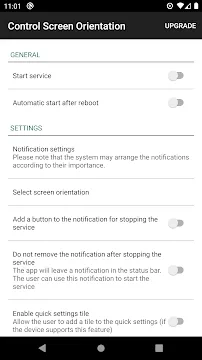
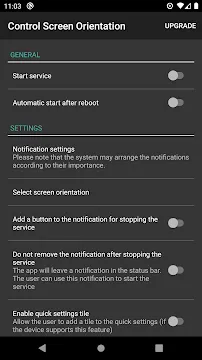
Control Screen Rotation gives you full authority over your device display. Many users struggle with automatic display changes. Sometimes, the screen rotates when you lie down. This behavior becomes very annoying quickly. Therefore, you need a reliable solution. Control Screen Rotation fixes this problem completely. It forces your display to stay in your preferred orientation. You can lock the screen in portrait mode. Alternatively, you can select landscape mode easily.
This tool works silently in the background. It does not slow down your operating system. You will experience seamless display control immediately after installation. Many people use their mobile devices while resting. Standard sensors cannot understand your posture. Consequently, the screen flips back and forth constantly. This tool eliminates that specific frustration entirely. It keeps your view exactly how you want it. You can finally enjoy your content without continuous manual adjustments. It offers a permanent fix for flawed automatic rotation features.
Why You Need to Control Screen Rotation
Standard device settings often fail to meet user needs. For instance, reading an e-book in bed triggers unwanted shifting. You lose your place because the screen flips suddenly. Consequently, you feel frustrated with your device. You can easily control screen rotation with this specific tool. It overrides the default system sensors effectively. As a result, your screen remains stable regardless of your physical movement.
This stability improves your overall reading experience. Furthermore, it saves battery power over time. Your device does not constantly use internal sensors to check orientation. Therefore, you enjoy a smoother experience every day. Unwanted rotation also disrupts video playback. When you move slightly, the video changes size. The tool prevents that interruption from happening. You can focus on your media without distractions. Persistent screen flipping can also strain your eyes. A steady display allows for comfortable long-term viewing. You will notice the difference immediately during your evening reading sessions.
Main Features of Control Screen Rotation
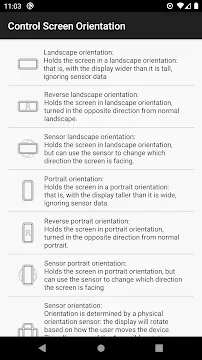
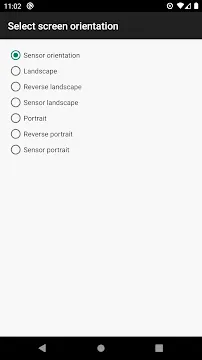
Control Screen Rotation offers several important modes for daily use. You can customize how your device reacts to movement. You can select distinct layouts for different tasks. Here are the core modes available within the tool:
- Portrait lock keeps the display vertical at all times.
- Landscape mode expands videos to fill the screen properly.
- Reverse portrait flips the screen upside down safely.
- Reverse landscape turns the display to the opposite horizontal side.
- Auto-force forces stubborn mobile programs to follow your personal orientation choice.
These choices give you complete freedom. You do not have to settle for basic factory options anymore. Instead, you dictate how every single layout looks on your device screen. Each mode serves a clear purpose for different user preferences. You can switch between these modes with a single click. The tool applies your chosen layout globally across the entire system instantly.
How to Set Up the Tool Quickly
Installing the tool requires only a few moments of your time. First, download Control Screen Rotation from the official store. Open the tool to view the main configuration dashboard. Then, grant the necessary system permissions. The tool needs permission to draw over other programs. This permission allows it to modify your display configuration securely.
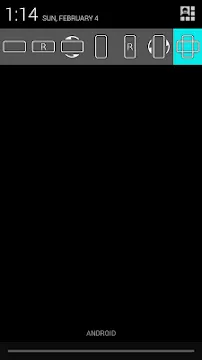
After that, select your desired orientation from the main list. Click the start button to activate the background service. A convenient notification bar will appear at the top of your screen. You can change settings directly from this notification panel. Consequently, you never have to open the main interface repeatedly. The setup process is simple for everyone. Even beginners can configure the tool without technical assistance. It guides you through each required step clearly during the initial launch.
When to Lock Your Display Mode
Specific situations require a fixed display orientation. For example, mobile gaming requires a stable horizontal view. Sudden movements can ruin your match during intense gameplay sessions. Therefore, locking the screen protects your performance. Driving also demands a static screen layout. If you use navigation maps, you need clear visibility.
A rotating map causes confusion and danger on the road. Thus, a locked view ensures your personal safety. Reading recipes in the kitchen is another great example. You can place the device on the counter safely. The display will not warp while you cook meals. The tool provides stability whenever you need it most. You can also lock the layout when showing photos to your friends. This prevents the image from changing scale when you pass the phone around.
Common Issues with Default Display Settings
Factory settings usually rely on a built-in gyroscope sensor. However, these sensors often lack real precision. They misinterpret simple movements as intentional layout flips. This issue affects many modern devices frequently. In addition, some programs do not support landscape orientation naturally. They force you to use vertical layouts against your will.
This limitation restricts your viewing pleasure significantly. Control Screen Rotation solves these system flaws instantly. It overrides program-specific restrictions without any technical issues. Therefore, you gain consistent behavior across all your software tools. You take back control of your device behavior completely. No software should dictate how you hold your own phone. This tool restores the flexibility that your device manufacturer left out.
Advanced Settings in Control Screen Rotation
This tool includes special settings for power users. For instance, you can enable the auto-start feature. This feature launches Control Screen Rotation when your device turns on. Therefore, you do not have to open it manually every single morning. You can also customize the notification widget appearance.
Choose between compact or expanded control buttons easily. Furthermore, you can set specific rules for individual programs. You might want portrait mode for text messages. Meanwhile, you may prefer landscape mode for video platforms. The tool handles these switches automatically behind the scenes. It adapts to your lifestyle perfectly. You can build a completely personalized display environment with minimal effort. These advanced options guarantee an optimized user experience across your entire device lifecycle.
Conclusion
Managing your display should not cause daily headaches. Control Screen Rotation simplifies your mobile experience dramatically. It replaces unreliable factory settings with precise options. Because it runs lightweight, it never drains your battery life. You get a dependable solution for reading, gaming, and navigation. Download the tool today to experience true convenience.
Say goodbye to accidental screen flips forever. Enjoy a stable and predictable display layout from now on. You deserve complete authority over your device view. This tool provides exactly what you need for daily comfort. Your mobile device will finally behave exactly as you expect. Invest a few moments into downloading this tool for immediate long-term satisfaction.